> ## Documentation Index
> Fetch the complete documentation index at: https://docs-staging-ai-docs-migration.mintlify.site/llms.txt
> Use this file to discover all available pages before exploring further.

> Learn how to configure an update policy form using Forms for Actions for users to review and accept new terms of service or consent updates.

# Use Cases: Configure an update policy form using Forms

<Card title="Before you start">
  1. Create a [Machine-to-Machine Application](/docs/get-started/auth0-overview/create-applications/machine-to-machine-apps) with the following scopes enabled:

  * `read:users`
  * `update:users`
  * `create:users`
  * `read:users_app_metadata`
  * `update:users_app_metadata`
  * `create:users_app_metadata`

  2. Add a [Vault connection](/docs/customize/forms/vault) using the M2M application credentials.
</Card>

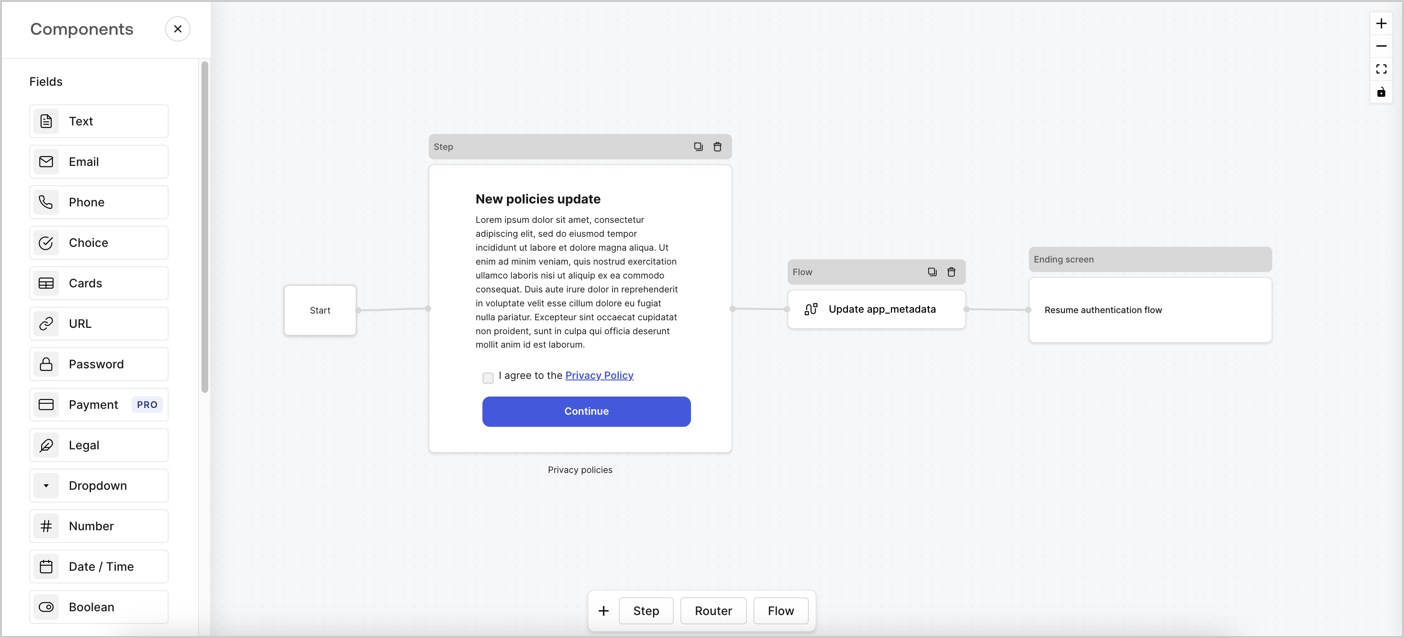
Forms for Actions allows you to create custom privacy policies flows and store the consent under the `app_metadata` object.
<Frame>
  <img src="https://mintcdn.com/docs-staging-ai-docs-migration/sSrENhYzl-t8TW3J/docs/images/cdy7uua7fh8z/6i68dMvHDTijfRmSgN1x8Q/ad900e7d4c0fb34645921435472b8684/privavy-policy-form.png?fit=max&auto=format&n=sSrENhYzl-t8TW3J&q=85&s=75a43eb37330b4d2ac0cfe58bc2c1b71" alt="Dashboard > Actions > Forms > Privacy policy use case" data-og-width="1404" width="1404" data-og-height="638" height="638" data-path="docs/images/cdy7uua7fh8z/6i68dMvHDTijfRmSgN1x8Q/ad900e7d4c0fb34645921435472b8684/privavy-policy-form.png" data-optimize="true" data-opv="3" srcset="https://mintcdn.com/docs-staging-ai-docs-migration/sSrENhYzl-t8TW3J/docs/images/cdy7uua7fh8z/6i68dMvHDTijfRmSgN1x8Q/ad900e7d4c0fb34645921435472b8684/privavy-policy-form.png?w=280&fit=max&auto=format&n=sSrENhYzl-t8TW3J&q=85&s=0f723c69f464066cfe7465c6308c676d 280w, https://mintcdn.com/docs-staging-ai-docs-migration/sSrENhYzl-t8TW3J/docs/images/cdy7uua7fh8z/6i68dMvHDTijfRmSgN1x8Q/ad900e7d4c0fb34645921435472b8684/privavy-policy-form.png?w=560&fit=max&auto=format&n=sSrENhYzl-t8TW3J&q=85&s=9832c6ac8743230d7f02edc54266feaa 560w, https://mintcdn.com/docs-staging-ai-docs-migration/sSrENhYzl-t8TW3J/docs/images/cdy7uua7fh8z/6i68dMvHDTijfRmSgN1x8Q/ad900e7d4c0fb34645921435472b8684/privavy-policy-form.png?w=840&fit=max&auto=format&n=sSrENhYzl-t8TW3J&q=85&s=c0f885096215abc4b11c7296e50046cd 840w, https://mintcdn.com/docs-staging-ai-docs-migration/sSrENhYzl-t8TW3J/docs/images/cdy7uua7fh8z/6i68dMvHDTijfRmSgN1x8Q/ad900e7d4c0fb34645921435472b8684/privavy-policy-form.png?w=1100&fit=max&auto=format&n=sSrENhYzl-t8TW3J&q=85&s=f89be8ae74a09f5b2aa55f867365fee0 1100w, https://mintcdn.com/docs-staging-ai-docs-migration/sSrENhYzl-t8TW3J/docs/images/cdy7uua7fh8z/6i68dMvHDTijfRmSgN1x8Q/ad900e7d4c0fb34645921435472b8684/privavy-policy-form.png?w=1650&fit=max&auto=format&n=sSrENhYzl-t8TW3J&q=85&s=68c618f06328dbb0e66a9f965527896b 1650w, https://mintcdn.com/docs-staging-ai-docs-migration/sSrENhYzl-t8TW3J/docs/images/cdy7uua7fh8z/6i68dMvHDTijfRmSgN1x8Q/ad900e7d4c0fb34645921435472b8684/privavy-policy-form.png?w=2500&fit=max&auto=format&n=sSrENhYzl-t8TW3J&q=85&s=527e097b6edc439d9ce2722f0151c93a 2500w" />
</Frame>

The sections below outline how you can create an Update Policy form using nodes and flows, along with steps for adding your form to a [Post Login](/docs/customize/actions/explore-triggers/signup-and-login-triggers/login-trigger) Action.

## Create a form from scratch

Follow these steps to create a form to gather information:

1. Open the Form editor by selecting **Auth0 Dashboard > Actions > Forms.**
2. Select **Create Form** > **Start from scratch**.

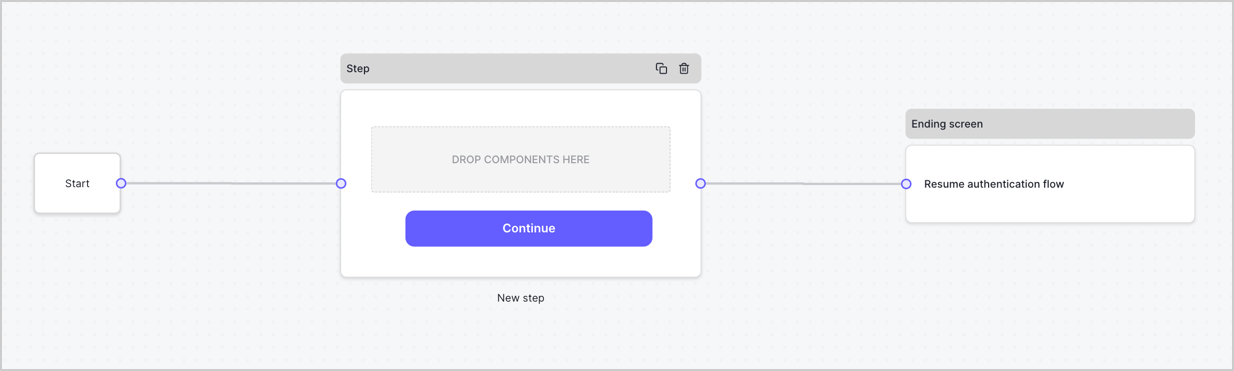
By default, a new form contains a Start node, a Step node, and an Ending screen node.
<Frame>
  <img src="https://mintcdn.com/docs-staging-ai-docs-migration/DYHIYxQ7AtrB6mkA/docs/images/cdy7uua7fh8z/2TZ9jSjgEcARFpULI6hz4R/a4319a1bd482f2ee5cc23100fdb2f42c/New-form-Forms-for-action-use-case.png?fit=max&auto=format&n=DYHIYxQ7AtrB6mkA&q=85&s=20b58033f78e6de791ea3639d14bcc1a" alt="Dashboard > Forms > Use Cases > Form" data-og-width="1234" width="1234" data-og-height="371" height="371" data-path="docs/images/cdy7uua7fh8z/2TZ9jSjgEcARFpULI6hz4R/a4319a1bd482f2ee5cc23100fdb2f42c/New-form-Forms-for-action-use-case.png" data-optimize="true" data-opv="3" srcset="https://mintcdn.com/docs-staging-ai-docs-migration/DYHIYxQ7AtrB6mkA/docs/images/cdy7uua7fh8z/2TZ9jSjgEcARFpULI6hz4R/a4319a1bd482f2ee5cc23100fdb2f42c/New-form-Forms-for-action-use-case.png?w=280&fit=max&auto=format&n=DYHIYxQ7AtrB6mkA&q=85&s=030b9ff1557d1e6af634221b54fdfac0 280w, https://mintcdn.com/docs-staging-ai-docs-migration/DYHIYxQ7AtrB6mkA/docs/images/cdy7uua7fh8z/2TZ9jSjgEcARFpULI6hz4R/a4319a1bd482f2ee5cc23100fdb2f42c/New-form-Forms-for-action-use-case.png?w=560&fit=max&auto=format&n=DYHIYxQ7AtrB6mkA&q=85&s=50f9816bf4b176c884983c3b171df492 560w, https://mintcdn.com/docs-staging-ai-docs-migration/DYHIYxQ7AtrB6mkA/docs/images/cdy7uua7fh8z/2TZ9jSjgEcARFpULI6hz4R/a4319a1bd482f2ee5cc23100fdb2f42c/New-form-Forms-for-action-use-case.png?w=840&fit=max&auto=format&n=DYHIYxQ7AtrB6mkA&q=85&s=66a9757d364cd77d758728a0e364fda9 840w, https://mintcdn.com/docs-staging-ai-docs-migration/DYHIYxQ7AtrB6mkA/docs/images/cdy7uua7fh8z/2TZ9jSjgEcARFpULI6hz4R/a4319a1bd482f2ee5cc23100fdb2f42c/New-form-Forms-for-action-use-case.png?w=1100&fit=max&auto=format&n=DYHIYxQ7AtrB6mkA&q=85&s=6867cb425a449e09aa78011ed294008d 1100w, https://mintcdn.com/docs-staging-ai-docs-migration/DYHIYxQ7AtrB6mkA/docs/images/cdy7uua7fh8z/2TZ9jSjgEcARFpULI6hz4R/a4319a1bd482f2ee5cc23100fdb2f42c/New-form-Forms-for-action-use-case.png?w=1650&fit=max&auto=format&n=DYHIYxQ7AtrB6mkA&q=85&s=0b2f02f03f653bb55ca00d2b101da629 1650w, https://mintcdn.com/docs-staging-ai-docs-migration/DYHIYxQ7AtrB6mkA/docs/images/cdy7uua7fh8z/2TZ9jSjgEcARFpULI6hz4R/a4319a1bd482f2ee5cc23100fdb2f42c/New-form-Forms-for-action-use-case.png?w=2500&fit=max&auto=format&n=DYHIYxQ7AtrB6mkA&q=85&s=7197efebdb43a17bf7231903deb42ed3 2500w" />
</Frame>

### Configure the Step node

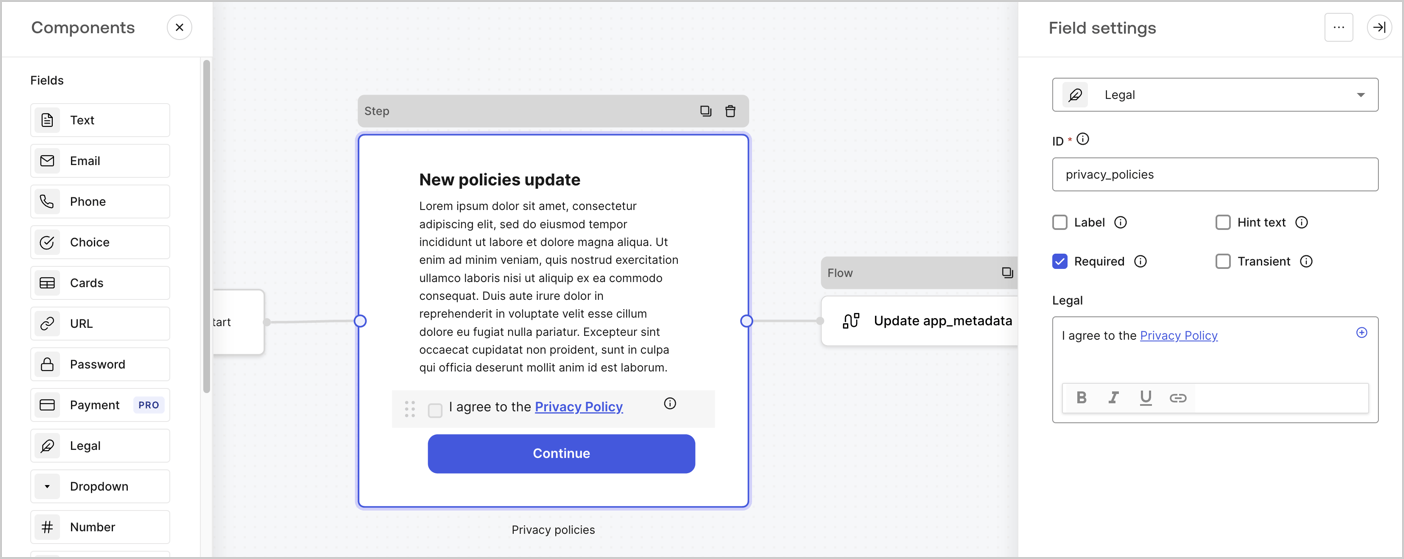
The Step node is the graphical interface visible to users. Add [Fields](/docs/customize/forms/nodes-and-components) to the Step node to collect the new agreement acceptance value by following these steps:

1. Drag a **Rich text** field from the **Components menu** into the **Step** node.

   * **Rich text**: Enter a description of your privacy policies updates.
   * Select **Save**.
2. Drag a **Legal** field into the **Step** node.

   * **ID**: Enter `privacy_policies`.
   * **Required**: Enable the checkbox.
   * **Legal**: Enter `I agree to the Privacy Policy`.
   * Select **Save**.
3. Select **Publish** to save.
<Frame>
  <img src="https://mintcdn.com/docs-staging-ai-docs-migration/MzWuU6VLbDLm1FQI/docs/images/cdy7uua7fh8z/59zFFjQjAnjogkc2QGIqqJ/0ad66b1b636544122aa4e65968b76c2c/privacy-policy-step-node.png?fit=max&auto=format&n=MzWuU6VLbDLm1FQI&q=85&s=b7e658c0440e9d6f166b7b059f920f03" alt="Dashboard > Actions > Forms > Use case privacy policy step node" data-og-width="1404" width="1404" data-og-height="559" height="559" data-path="docs/images/cdy7uua7fh8z/59zFFjQjAnjogkc2QGIqqJ/0ad66b1b636544122aa4e65968b76c2c/privacy-policy-step-node.png" data-optimize="true" data-opv="3" srcset="https://mintcdn.com/docs-staging-ai-docs-migration/MzWuU6VLbDLm1FQI/docs/images/cdy7uua7fh8z/59zFFjQjAnjogkc2QGIqqJ/0ad66b1b636544122aa4e65968b76c2c/privacy-policy-step-node.png?w=280&fit=max&auto=format&n=MzWuU6VLbDLm1FQI&q=85&s=f64468c3a852066c5543ab14f1195a2c 280w, https://mintcdn.com/docs-staging-ai-docs-migration/MzWuU6VLbDLm1FQI/docs/images/cdy7uua7fh8z/59zFFjQjAnjogkc2QGIqqJ/0ad66b1b636544122aa4e65968b76c2c/privacy-policy-step-node.png?w=560&fit=max&auto=format&n=MzWuU6VLbDLm1FQI&q=85&s=86ca3693b36bfab41bfbd47adac4edc1 560w, https://mintcdn.com/docs-staging-ai-docs-migration/MzWuU6VLbDLm1FQI/docs/images/cdy7uua7fh8z/59zFFjQjAnjogkc2QGIqqJ/0ad66b1b636544122aa4e65968b76c2c/privacy-policy-step-node.png?w=840&fit=max&auto=format&n=MzWuU6VLbDLm1FQI&q=85&s=e128e18df338b807515853b6f088db99 840w, https://mintcdn.com/docs-staging-ai-docs-migration/MzWuU6VLbDLm1FQI/docs/images/cdy7uua7fh8z/59zFFjQjAnjogkc2QGIqqJ/0ad66b1b636544122aa4e65968b76c2c/privacy-policy-step-node.png?w=1100&fit=max&auto=format&n=MzWuU6VLbDLm1FQI&q=85&s=d62b3d79e06cd72cc2a687eb6d2e4d78 1100w, https://mintcdn.com/docs-staging-ai-docs-migration/MzWuU6VLbDLm1FQI/docs/images/cdy7uua7fh8z/59zFFjQjAnjogkc2QGIqqJ/0ad66b1b636544122aa4e65968b76c2c/privacy-policy-step-node.png?w=1650&fit=max&auto=format&n=MzWuU6VLbDLm1FQI&q=85&s=4e2a142b79cea2b351452ac701f48a5f 1650w, https://mintcdn.com/docs-staging-ai-docs-migration/MzWuU6VLbDLm1FQI/docs/images/cdy7uua7fh8z/59zFFjQjAnjogkc2QGIqqJ/0ad66b1b636544122aa4e65968b76c2c/privacy-policy-step-node.png?w=2500&fit=max&auto=format&n=MzWuU6VLbDLm1FQI&q=85&s=1fc6b4027a7a1fa9c4fdc70cd7b1ddb8 2500w" />
</Frame>

### Configure the Flow node

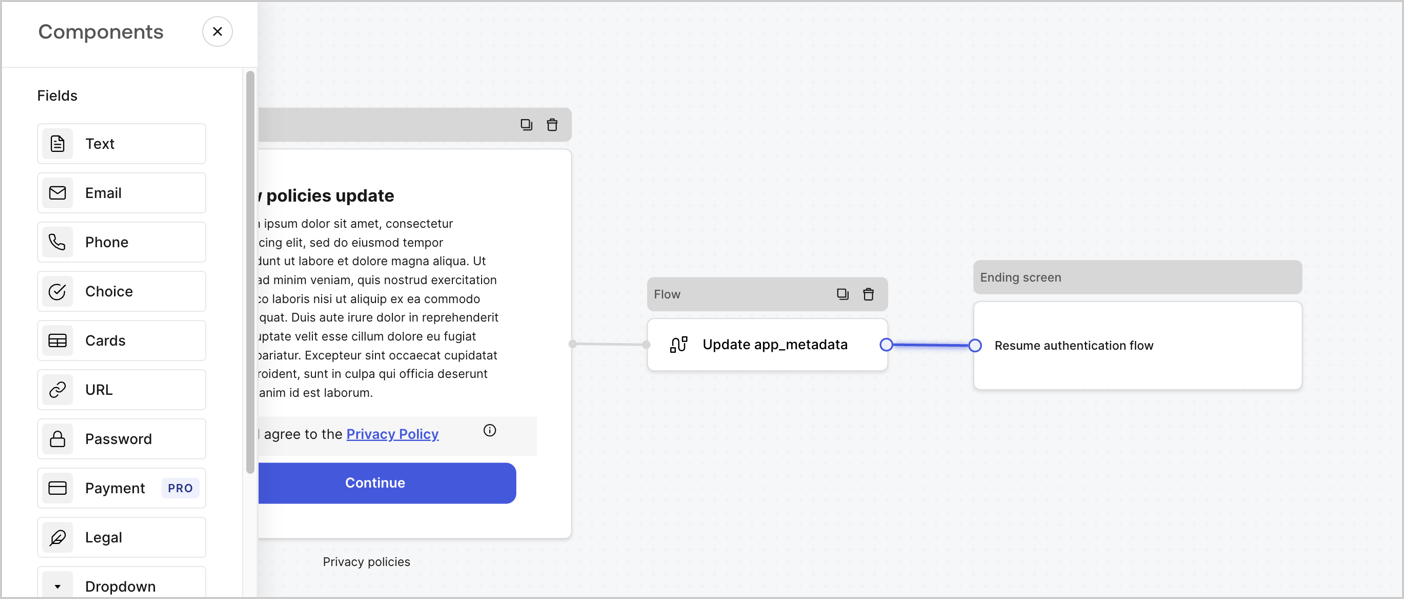
Add a **Flow** node after the **Step** node to update the `app_metadata` and resume the authentication flow by following these steps:

1. Select **Flow** from the bottom of the Form editor.
2. Remove the existing link between the **Step** and **Ending Screen** nodes.
3. Select the new **Flow** > **Click to add a flow** > **Create a new flow.**

   * Enter `Update app_metadata` in the **Name** field.
   * Select **Create**.
   * Select **Save**.
4. Link the **Flow** node to the **Step** and **Ending Screen** nodes as pictured below.
5. Select **Publish** to save.
<Frame>
  <img src="https://mintcdn.com/docs-staging-ai-docs-migration/W28NABjaYxkauCkj/docs/images/cdy7uua7fh8z/6YIkzm7SrpM9LW76AXuRzh/353c518fe82bbaa440836da1d83596d6/link-policies.png?fit=max&auto=format&n=W28NABjaYxkauCkj&q=85&s=773bf0c45a8071a6059b30d1f9d563bf" alt="Dashboard > Actions > Forms > Form" data-og-width="1404" width="1404" data-og-height="599" height="599" data-path="docs/images/cdy7uua7fh8z/6YIkzm7SrpM9LW76AXuRzh/353c518fe82bbaa440836da1d83596d6/link-policies.png" data-optimize="true" data-opv="3" srcset="https://mintcdn.com/docs-staging-ai-docs-migration/W28NABjaYxkauCkj/docs/images/cdy7uua7fh8z/6YIkzm7SrpM9LW76AXuRzh/353c518fe82bbaa440836da1d83596d6/link-policies.png?w=280&fit=max&auto=format&n=W28NABjaYxkauCkj&q=85&s=f27cd739adcfb490038d7182706c299f 280w, https://mintcdn.com/docs-staging-ai-docs-migration/W28NABjaYxkauCkj/docs/images/cdy7uua7fh8z/6YIkzm7SrpM9LW76AXuRzh/353c518fe82bbaa440836da1d83596d6/link-policies.png?w=560&fit=max&auto=format&n=W28NABjaYxkauCkj&q=85&s=9dc73676ffa4d4ac00f5ff8d64218568 560w, https://mintcdn.com/docs-staging-ai-docs-migration/W28NABjaYxkauCkj/docs/images/cdy7uua7fh8z/6YIkzm7SrpM9LW76AXuRzh/353c518fe82bbaa440836da1d83596d6/link-policies.png?w=840&fit=max&auto=format&n=W28NABjaYxkauCkj&q=85&s=0ef0c89e319fb945f4a0830216a8509f 840w, https://mintcdn.com/docs-staging-ai-docs-migration/W28NABjaYxkauCkj/docs/images/cdy7uua7fh8z/6YIkzm7SrpM9LW76AXuRzh/353c518fe82bbaa440836da1d83596d6/link-policies.png?w=1100&fit=max&auto=format&n=W28NABjaYxkauCkj&q=85&s=b41d4e85f6628187bc6b0a651018ba28 1100w, https://mintcdn.com/docs-staging-ai-docs-migration/W28NABjaYxkauCkj/docs/images/cdy7uua7fh8z/6YIkzm7SrpM9LW76AXuRzh/353c518fe82bbaa440836da1d83596d6/link-policies.png?w=1650&fit=max&auto=format&n=W28NABjaYxkauCkj&q=85&s=bc3cc3ec6ddbc1782d7740e9b23252e5 1650w, https://mintcdn.com/docs-staging-ai-docs-migration/W28NABjaYxkauCkj/docs/images/cdy7uua7fh8z/6YIkzm7SrpM9LW76AXuRzh/353c518fe82bbaa440836da1d83596d6/link-policies.png?w=2500&fit=max&auto=format&n=W28NABjaYxkauCkj&q=85&s=485daad44747fa112b2ea6080d1feb2c 2500w" />
</Frame>

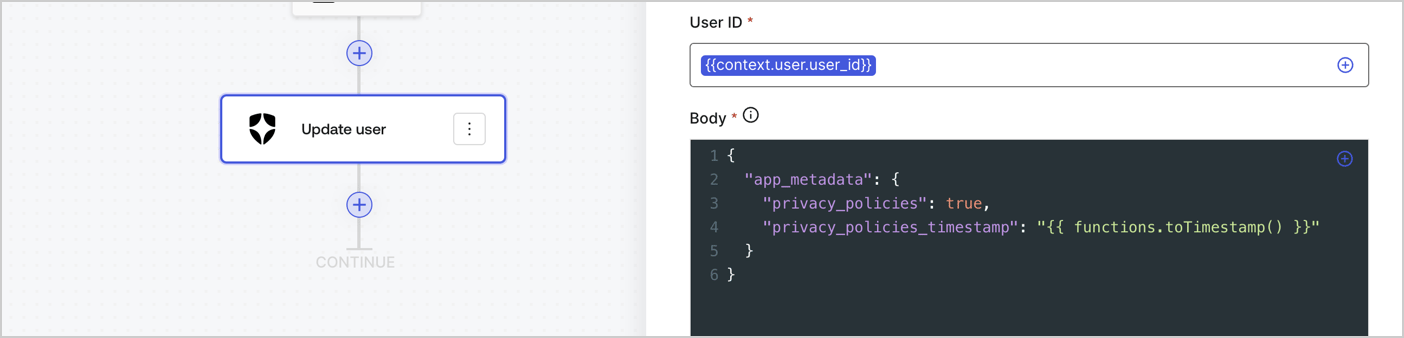
Add an Auth0 Update user action to the flow by following these steps:

1. Select the **Flow** **Update app\_metadata** > **Edit flow** to open the Flow editor in a new tab.
2. Below the StartAction, select the **+** icon to add an **Update user** action. Complete the fields below, then select **Save** to continue.

   * **Connection**: Select from the dropdown the Vault connection to your M2M application.

   * **User ID**: Enter `{{context.user.user_id}}`.

   * **Body**: Copy and paste the following code to update the app\_metadata with the privacy\_policies and privacy\_policies\_timestamp properties.

     ```text lines theme={null}
     {
       "app_metadata": {
         "privacy_policies": true,
         "privacy_policies_timestamp": "{{ functions.toTimestamp() }}"
       }
     }
     ```

   * Select **Save**.
3. Select **Publish** to save.
<Frame>
  <img src="https://mintcdn.com/docs-staging-ai-docs-migration/IueVKPzzG4CAWAOH/docs/images/cdy7uua7fh8z/CvMNIwWrOUwaFW4X3G28p/1fb70ae57a20749d9ffaaba8dc0b7e26/update-user-privacy.png?fit=max&auto=format&n=IueVKPzzG4CAWAOH&q=85&s=032d99790659efb92bfbaa53d6774e1e" alt="Dashboard > Actions > Forms > User case privacy policy code" data-og-width="1404" width="1404" data-og-height="338" height="338" data-path="docs/images/cdy7uua7fh8z/CvMNIwWrOUwaFW4X3G28p/1fb70ae57a20749d9ffaaba8dc0b7e26/update-user-privacy.png" data-optimize="true" data-opv="3" srcset="https://mintcdn.com/docs-staging-ai-docs-migration/IueVKPzzG4CAWAOH/docs/images/cdy7uua7fh8z/CvMNIwWrOUwaFW4X3G28p/1fb70ae57a20749d9ffaaba8dc0b7e26/update-user-privacy.png?w=280&fit=max&auto=format&n=IueVKPzzG4CAWAOH&q=85&s=abd5c6ee7d734e27d9cdfc95cf600bd8 280w, https://mintcdn.com/docs-staging-ai-docs-migration/IueVKPzzG4CAWAOH/docs/images/cdy7uua7fh8z/CvMNIwWrOUwaFW4X3G28p/1fb70ae57a20749d9ffaaba8dc0b7e26/update-user-privacy.png?w=560&fit=max&auto=format&n=IueVKPzzG4CAWAOH&q=85&s=ad1f87251588556a24f199105a117e38 560w, https://mintcdn.com/docs-staging-ai-docs-migration/IueVKPzzG4CAWAOH/docs/images/cdy7uua7fh8z/CvMNIwWrOUwaFW4X3G28p/1fb70ae57a20749d9ffaaba8dc0b7e26/update-user-privacy.png?w=840&fit=max&auto=format&n=IueVKPzzG4CAWAOH&q=85&s=7c006a462ac0fb631274c775717fcf5c 840w, https://mintcdn.com/docs-staging-ai-docs-migration/IueVKPzzG4CAWAOH/docs/images/cdy7uua7fh8z/CvMNIwWrOUwaFW4X3G28p/1fb70ae57a20749d9ffaaba8dc0b7e26/update-user-privacy.png?w=1100&fit=max&auto=format&n=IueVKPzzG4CAWAOH&q=85&s=94219ef74d76500ec9748293f28f5505 1100w, https://mintcdn.com/docs-staging-ai-docs-migration/IueVKPzzG4CAWAOH/docs/images/cdy7uua7fh8z/CvMNIwWrOUwaFW4X3G28p/1fb70ae57a20749d9ffaaba8dc0b7e26/update-user-privacy.png?w=1650&fit=max&auto=format&n=IueVKPzzG4CAWAOH&q=85&s=a3da9cabdd8c8a5575b343c3beae2433 1650w, https://mintcdn.com/docs-staging-ai-docs-migration/IueVKPzzG4CAWAOH/docs/images/cdy7uua7fh8z/CvMNIwWrOUwaFW4X3G28p/1fb70ae57a20749d9ffaaba8dc0b7e26/update-user-privacy.png?w=2500&fit=max&auto=format&n=IueVKPzzG4CAWAOH&q=85&s=f55e3e3acaa84267f8b73a96776fe3b7 2500w" />
</Frame>

<Callout icon="file-lines" color="#0EA5E9" iconType="regular">
  The flow **Update app\_metadata** adds a `privacy_policies true` value to the app`_metadata` object and also generates a timestamp with a [helper function.](/docs/customize/forms/variables)
</Callout>

## Retrieve the form render code

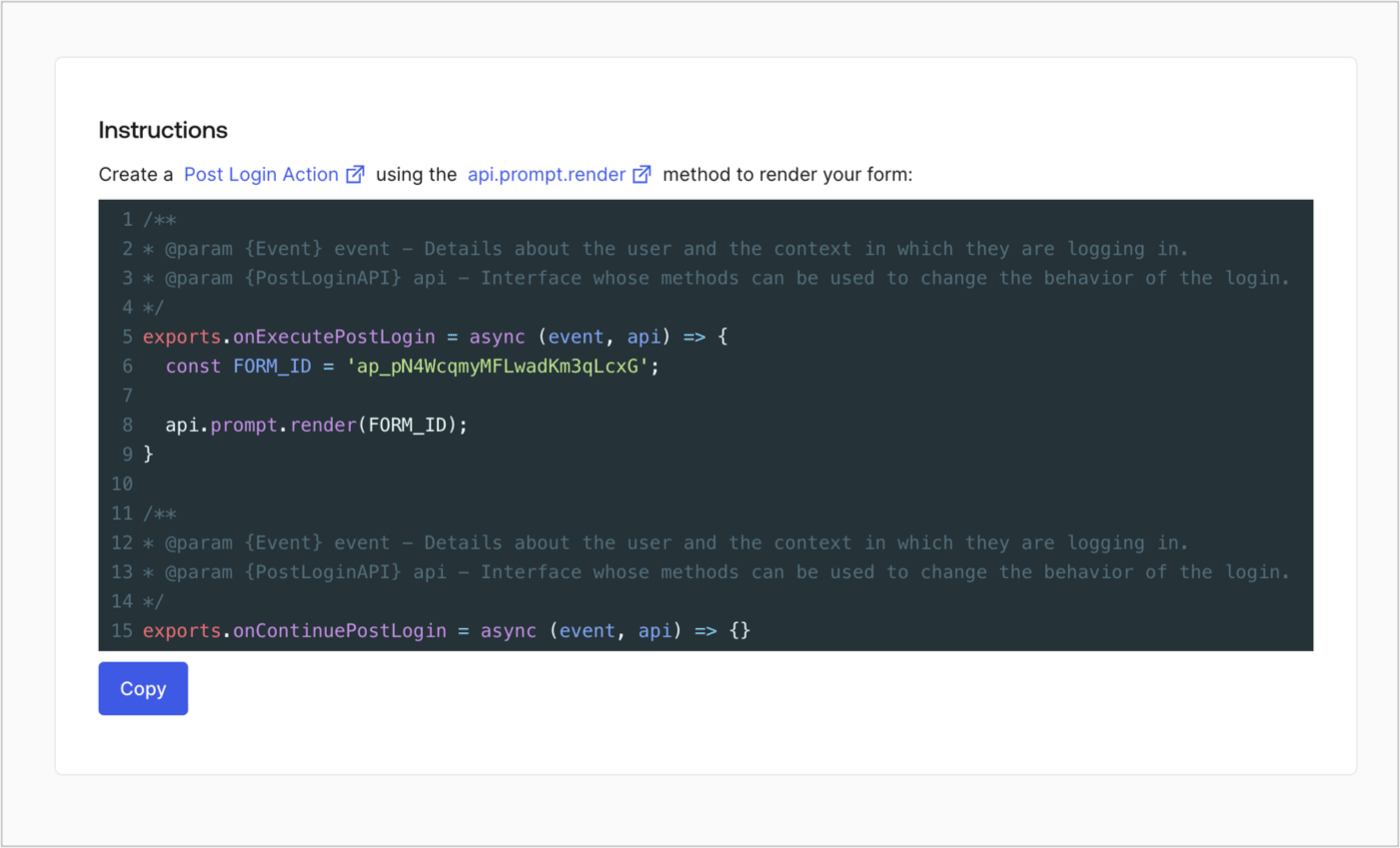
Retrieve your form render code to visually render the form with a custom Post Login Action by following these steps:

* From the Form editor, select **`<> Render`**.
* Select **Copy**.
<Frame>
  <img src="https://mintcdn.com/docs-staging-ai-docs-migration/DYHIYxQ7AtrB6mkA/docs/images/cdy7uua7fh8z/2EIUzc539sq9lwoTKbjoJv/496a864c0fc44a782c9cadca119dbfb0/embed.png?fit=max&auto=format&n=DYHIYxQ7AtrB6mkA&q=85&s=6489671ef1381f325f27d74b96c38fc1" alt="Dashboard > Actions > Forms > Form > Embed" data-og-width="1400" width="1400" data-og-height="848" height="848" data-path="docs/images/cdy7uua7fh8z/2EIUzc539sq9lwoTKbjoJv/496a864c0fc44a782c9cadca119dbfb0/embed.png" data-optimize="true" data-opv="3" srcset="https://mintcdn.com/docs-staging-ai-docs-migration/DYHIYxQ7AtrB6mkA/docs/images/cdy7uua7fh8z/2EIUzc539sq9lwoTKbjoJv/496a864c0fc44a782c9cadca119dbfb0/embed.png?w=280&fit=max&auto=format&n=DYHIYxQ7AtrB6mkA&q=85&s=0c916845c0b8844aa1600f5e4d34915b 280w, https://mintcdn.com/docs-staging-ai-docs-migration/DYHIYxQ7AtrB6mkA/docs/images/cdy7uua7fh8z/2EIUzc539sq9lwoTKbjoJv/496a864c0fc44a782c9cadca119dbfb0/embed.png?w=560&fit=max&auto=format&n=DYHIYxQ7AtrB6mkA&q=85&s=26d621ce45bc47335eafa16dc8891fca 560w, https://mintcdn.com/docs-staging-ai-docs-migration/DYHIYxQ7AtrB6mkA/docs/images/cdy7uua7fh8z/2EIUzc539sq9lwoTKbjoJv/496a864c0fc44a782c9cadca119dbfb0/embed.png?w=840&fit=max&auto=format&n=DYHIYxQ7AtrB6mkA&q=85&s=d7169b303bd30d6cd0b94cee4e1cd028 840w, https://mintcdn.com/docs-staging-ai-docs-migration/DYHIYxQ7AtrB6mkA/docs/images/cdy7uua7fh8z/2EIUzc539sq9lwoTKbjoJv/496a864c0fc44a782c9cadca119dbfb0/embed.png?w=1100&fit=max&auto=format&n=DYHIYxQ7AtrB6mkA&q=85&s=aa6a7b7585ad2883ef128d86fa41c895 1100w, https://mintcdn.com/docs-staging-ai-docs-migration/DYHIYxQ7AtrB6mkA/docs/images/cdy7uua7fh8z/2EIUzc539sq9lwoTKbjoJv/496a864c0fc44a782c9cadca119dbfb0/embed.png?w=1650&fit=max&auto=format&n=DYHIYxQ7AtrB6mkA&q=85&s=b362443ae6bdb342e5f86932846469a9 1650w, https://mintcdn.com/docs-staging-ai-docs-migration/DYHIYxQ7AtrB6mkA/docs/images/cdy7uua7fh8z/2EIUzc539sq9lwoTKbjoJv/496a864c0fc44a782c9cadca119dbfb0/embed.png?w=2500&fit=max&auto=format&n=DYHIYxQ7AtrB6mkA&q=85&s=4b69feb18cf837e0a5d72e119a4e9c48 2500w" />
</Frame>

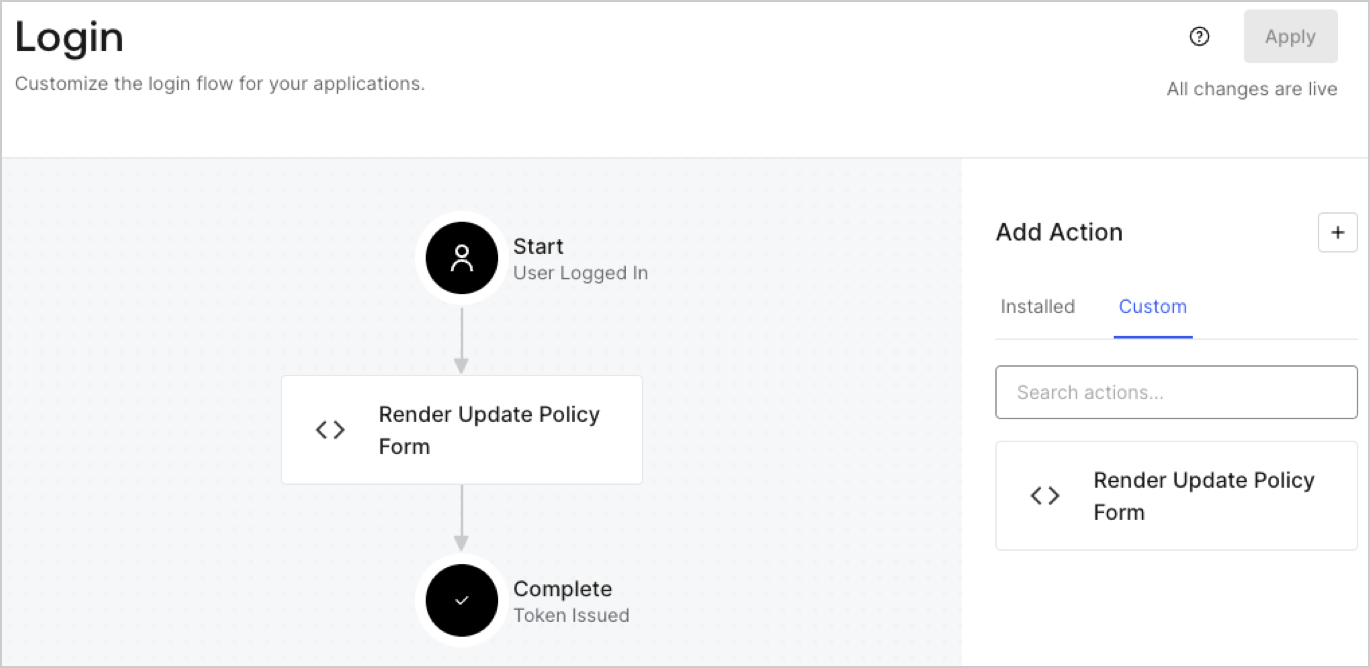
## Create a Post Login Action

Create a post-login Action to render your form by following these steps:

1. Navigate to **Auth0 Dashboard > Actions > Flows > Login.**
2. Select the **+** icon and Select **Build from scratch**:

   * **Name**: Enter `Render Update Policy Form`.
   * **Trigger**: Select `Login / Post Login`.
   * **Runtime**: Select the recommended version.
3. Select **Create**.

To configure the post-login Action:

1. Delete the existing code from the Code editor.
2. Paste the form render code into the Code editor.
3. Edit the code to define the conditional logic that will render the form.

   ```javascript lines theme={null}
   /**
   * @param {Event} event - Details about the user and the context in which they are logging in.
   * @param {PostLoginAPI} api - Interface whose methods can be used to change the behavior of the login.
   */
   exports.onExecutePostLogin = async (event, api) => {
     const FORM_ID = 'REPLACE_WITH_YOUR_FORM_ID';

     if (event.user.app_metadata.privacy_policies !== true) {
       api.prompt.render(FORM_ID);
     }
   }

   exports.onContinuePostLogin = async (event, api) => { }
   ```

   <Callout icon="file-lines" color="#0EA5E9" iconType="regular">
     The example code above will render the form when a user is missing the app metadata `privacy_policies` property.
   </Callout>
4. Select **Deploy.**
5. Drag and Drop the **Render Update Policy Form** Action to the **Login** flow.
   <Frame>
     <img src="https://mintcdn.com/docs-staging-ai-docs-migration/MzWuU6VLbDLm1FQI/docs/images/cdy7uua7fh8z/5TOwDgevZsBqd7yZynUYWU/41ca909dc3007aed4f40ff794a05efa5/postlogin.png?fit=max&auto=format&n=MzWuU6VLbDLm1FQI&q=85&s=942200f967436cf02bb1466c44cb15f8" alt="Dashboard > Forms > Use Case > Render update policy form login action" data-og-width="1370" width="1370" data-og-height="668" height="668" data-path="docs/images/cdy7uua7fh8z/5TOwDgevZsBqd7yZynUYWU/41ca909dc3007aed4f40ff794a05efa5/postlogin.png" data-optimize="true" data-opv="3" srcset="https://mintcdn.com/docs-staging-ai-docs-migration/MzWuU6VLbDLm1FQI/docs/images/cdy7uua7fh8z/5TOwDgevZsBqd7yZynUYWU/41ca909dc3007aed4f40ff794a05efa5/postlogin.png?w=280&fit=max&auto=format&n=MzWuU6VLbDLm1FQI&q=85&s=7b211e9a7eae43d14f4bf15150af41c3 280w, https://mintcdn.com/docs-staging-ai-docs-migration/MzWuU6VLbDLm1FQI/docs/images/cdy7uua7fh8z/5TOwDgevZsBqd7yZynUYWU/41ca909dc3007aed4f40ff794a05efa5/postlogin.png?w=560&fit=max&auto=format&n=MzWuU6VLbDLm1FQI&q=85&s=495e7ebdd102e79036cdd8d86d225b3c 560w, https://mintcdn.com/docs-staging-ai-docs-migration/MzWuU6VLbDLm1FQI/docs/images/cdy7uua7fh8z/5TOwDgevZsBqd7yZynUYWU/41ca909dc3007aed4f40ff794a05efa5/postlogin.png?w=840&fit=max&auto=format&n=MzWuU6VLbDLm1FQI&q=85&s=9825b82e06c434a1d8acf858a9d542d5 840w, https://mintcdn.com/docs-staging-ai-docs-migration/MzWuU6VLbDLm1FQI/docs/images/cdy7uua7fh8z/5TOwDgevZsBqd7yZynUYWU/41ca909dc3007aed4f40ff794a05efa5/postlogin.png?w=1100&fit=max&auto=format&n=MzWuU6VLbDLm1FQI&q=85&s=60f806f3df0b531b5f3c77eeeb91ec01 1100w, https://mintcdn.com/docs-staging-ai-docs-migration/MzWuU6VLbDLm1FQI/docs/images/cdy7uua7fh8z/5TOwDgevZsBqd7yZynUYWU/41ca909dc3007aed4f40ff794a05efa5/postlogin.png?w=1650&fit=max&auto=format&n=MzWuU6VLbDLm1FQI&q=85&s=15f42c1228beb68fe1ed91a867598e0e 1650w, https://mintcdn.com/docs-staging-ai-docs-migration/MzWuU6VLbDLm1FQI/docs/images/cdy7uua7fh8z/5TOwDgevZsBqd7yZynUYWU/41ca909dc3007aed4f40ff794a05efa5/postlogin.png?w=2500&fit=max&auto=format&n=MzWuU6VLbDLm1FQI&q=85&s=2e8726554289de6a3e8ab7eef795dfec 2500w" />
   </Frame>
6. Select **Apply.**

### Test implementation

Test the implementation by following these steps:

1. Log in with an existing user whose app`_metadata` attribute `privacy_policies` does not have a value.
2. The post-login Action in the Login flow will render the form and prompt for acceptance.
3. Select **Auth0 Dashboard > User Management > Users,** locate the user and verify that the `app_metadata` attribute `privacy_policies` contains a `true` value and a timestamp.
